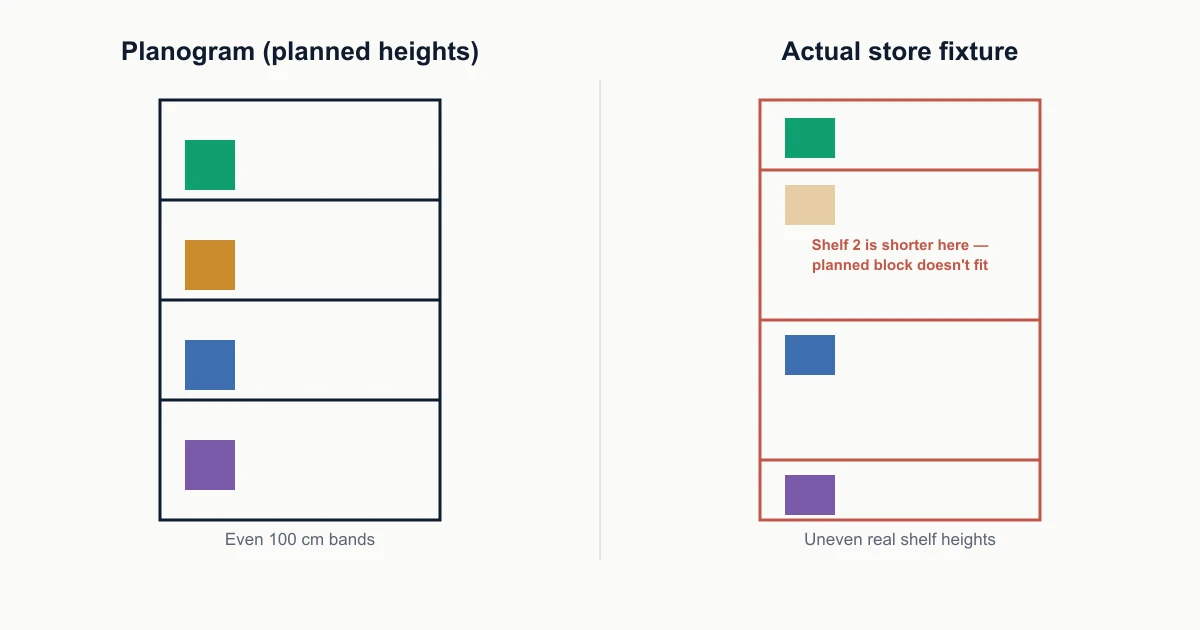
Planogram wrong shelf heights show up in two ways: the store set the shelves differently from the plan, or the plan's heights cannot be set on the store's fixture. Both lead to products that do not fit, blocks that break and capacity that is wrong. The fix starts with the slot numbering, the fixture data and the order in which the reset is done.
Shelf heights are often treated as a detail. They decide whether every product on the plan can physically go where it should.
How shelf heights are written on planograms
Plans usually give heights in one of three ways:
- centimetres or inches from the floor to the shelf top
- slot or notch numbers on the upright, counted from the base or the top
- clearance between shelves
Each retailer uses its own convention. If stores misread whether slots are counted from top or bottom, every shelf ends up wrong. The plan's legend should state it clearly; see how to read a planogram.
Five reasons for planogram wrong shelf heights
- Shelves were not moved before stocking. Staff restocked onto old shelf positions to save time.
- Different slot pitch. The store's uprights have a different slot spacing from the fixture the plan was built for.
- Different shelf count. The plan uses five shelves; the store's bay has four, or a fixed base deck.
- Misread convention. Slots counted from the wrong end.
- Pack changes. A taller pack forces a shelf up, pushing others out of position.
Fix it in this order
- Confirm the plan version and fixture. Is this the right plan for this bay size?
- Empty and reset heights first. Move shelves before any product goes back.
- Set from the bottom up, checking each shelf against the tallest product planned for it.
- Record the actual heights if they differ, with a photo, and report.
- Fix centrally. If many stores report the same issue, the plan needs a store variant or updated fixture data.
Prevent it
- Keep fixture data per store: uprights, slot pitch, shelf count.
- Print heights both as slot numbers and as centimetres.
- Put "move shelves first" at the top of every reset instruction.
- Give stores a quick change route; see store staff moving shelves without approval.
Our article on shelf clearance problems shows how to choose heights well in the first place.
Set the shelves before the stock
Planogram wrong shelf heights are rarely about one product; they shift the whole fixture. Make the convention clear, reset heights before stocking and keep fixture data accurate, and most fit problems disappear. Wikipedia's gondola entry explains the uprights and shelves involved, and Wikipedia's planogram entry shows how plans present them.
FAQ
How are shelf heights shown on a planogram?
As centimetres or inches from the floor, as slot or notch numbers on the upright, or as clearance between shelves, depending on the retailer.
Should shelves be moved before stocking during a reset?
Yes. Moving shelves after stocking means doing the work twice and often leads to wrong heights.
What if my fixture can't match the planned heights?
Set the closest practical heights, photograph them and report it so a store-specific version can be issued.
Why do slot numbers cause errors?
Retailers count slots from different ends and fixtures have different slot spacing, so plans can be misread.