Planogram PDF scale wrong on paper? The cause is almost always the printer's "fit to page" setting, a paper size different from the one the PDF was exported for, or an export that was never set to a true scale. The fix: export at a stated scale with a scale bar on the page, print at "actual size" on the intended paper, and print dimensions as numbers so nobody measures the drawing with a ruler.
Scale matters mainly when staff or planners check fit on paper. For store execution, numbers on the plan are more reliable than any printed scale.
Why scale goes wrong
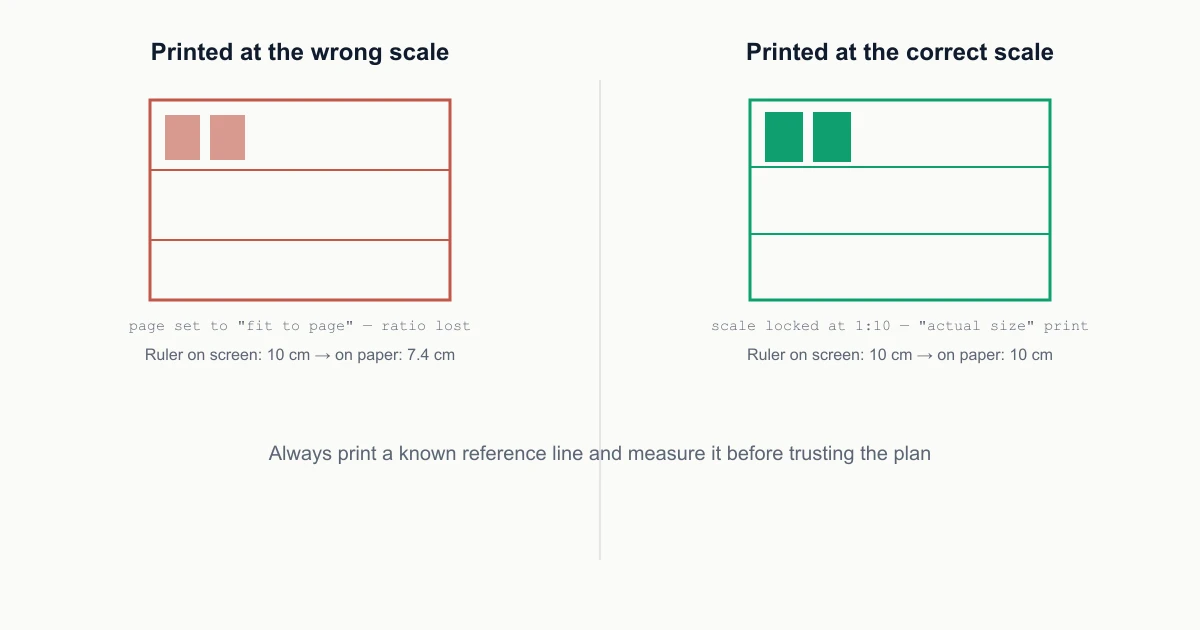
- Fit to page. Print dialogs often shrink content to fit printable margins, changing the scale by several percent.
- Paper mismatch. A PDF exported for A3 printed on A4, or for letter printed on A4, scales by large factors.
- No true scale at export. The PDF was exported "fit to page" from the planning tool, so it never had a fixed scale.
- Spreadsheet plans. Column widths set in characters rather than centimetres don't print to scale; see planogram in Excel.
Fixing a planogram PDF scale wrong at print time
1. Export at a stated scale
Choose a scale such as 1:10 and state it on the page. Many tools allow fixed-scale export; check before relying on it.
2. Add a scale bar
A printed bar ("10 cm at 1:10") lets anyone check the print: if the bar measures wrong, the print is scaled.
3. Print at actual size
Choose "Actual size" or "100%" in the print dialog, on the paper size the PDF was made for.
4. Print the numbers
Show shelf widths, heights and product facings as numbers on the plan. Staff should build from numbers, not by measuring the drawing.
When scale doesn't matter
For store resets, a perfectly scaled print is less important than clear codes, facings and shelf heights. Our tips for planogram printouts hard to read cover readability. Scale matters most when planners or suppliers review fit on paper.
Trust the numbers, check the bar
A planogram PDF scale wrong on paper is usually a print-setting problem. Export at a known scale with a scale bar, print at actual size on the right paper, and keep dimensions printed as numbers. Microsoft's guide to setting column width and row height in real units helps if your plans start in Excel, and Wikipedia's planogram entry explains what a to-scale plan shows.
FAQ
Why is my printed planogram not to scale?
Usually because the printer scaled it to fit the page, or it was printed on a different paper size from the export.
How do I print a PDF at actual size?
Select "Actual size" or 100% in the print dialog and use the paper size the PDF was created for.
What is a scale bar on a planogram?
A printed bar of known length, such as 10 cm at 1:10, used to check whether a printout is at the stated scale.
Should store staff measure products on printed planograms?
No. They should use the dimensions and facings printed as numbers.