This planogram implementation guide for store staff covers the everyday part of the job, not the big reset night: restocking to the plan, using shelf labels as the map, handling missing products, facing up, reporting problems and keeping each fixture matching its planogram until the next change. A plan built correctly on reset day drifts within weeks unless these habits are part of normal shifts.
For the reset itself (moving shelves, removing old products, setting a new layout), see our planogram reset guide. This page is for what happens every other day.
What a planogram is asking you to do
A planogram tells you, for each fixture: which product goes in each position, how many units across (facings), and sometimes how many deep. Your job is to keep that true. If you are new to reading the plans, start with how to read a planogram.
Seven habits in this planogram implementation guide for store staff
1. Restock to the label, not to the gap
Shelf labels are placed in planogram order. Put each product back above its own label, even if a neighbouring space looks emptier. The label is the map.
2. Fill the facings before the depth
When stock is short, cover all planned facings with at least one unit before filling depth. A full-width, shallow facing looks better and sells better than one deep column next to an empty space.
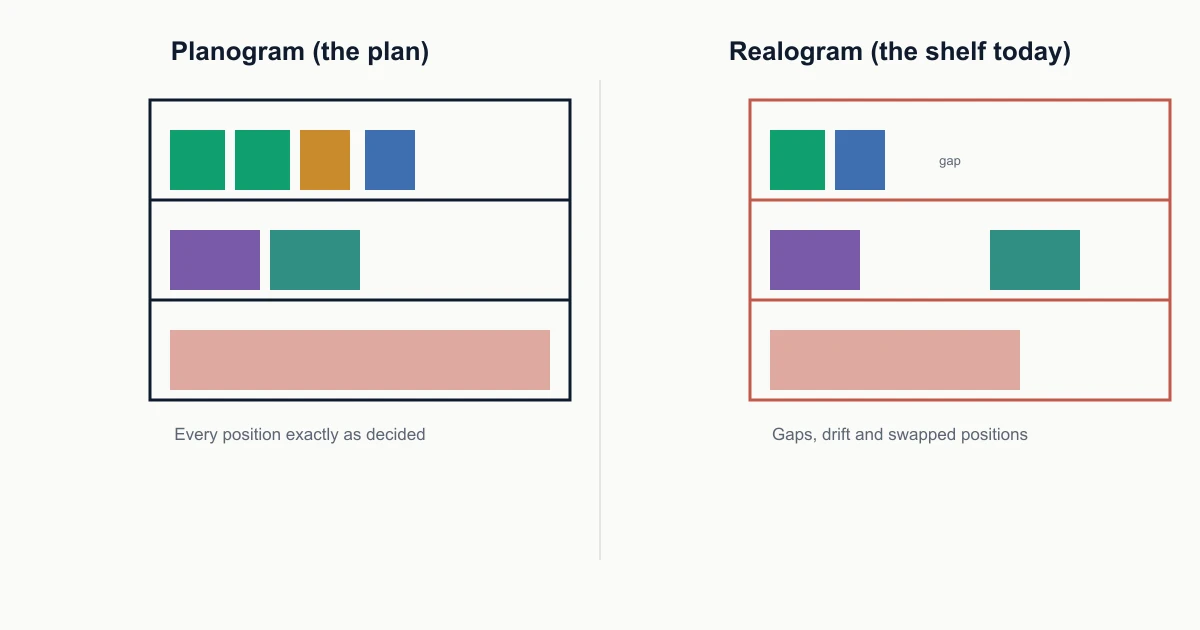
3. Leave real gaps empty
If a product is out of stock, leave its space and label in place. Do not spread the neighbour into it. Report it so it can be reordered; an empty labelled space is a signal, a filled one hides the problem.
4. Face up regularly
Pull products forward to the shelf edge with labels facing out, especially before busy periods. Wikipedia's facing page describes this routine task.
5. Rotate stock
Put new stock behind older stock (first in, first out), especially for dated products. Check the back of the shelf when restocking, not just the front.
6. Keep returns and strays moving
Products left in the wrong place by shoppers go back to their own label at every walk-through. Items with no label on a fixture probably do not belong there; take them to the backroom or the right aisle.
7. Report what does not fit
If a product will not fit its space, a label is missing or a product looks different from the plan, report it with a photo. Do not rearrange the shelf to make it work; one fix often breaks another part of the plan.
What to report, and how
| Problem | What to send |
|---|---|
| Product does not fit | Photo, product name, shelf and position |
| Label missing or wrong | Photo of the shelf edge |
| Product on plan never arrives | Product name and date first noticed |
| Shelf height cannot be set as planned | Photo and fixture name |
Good reports get plans fixed. Silent workarounds keep the same problem in every store.
A five-minute fixture check
Once a shift, pick one fixture and check: every label has its product above it, facings match the plan, nothing sits without a label, and older stock is at the front. Over a week that covers the store. The same checks are what auditors use to score planogram compliance.
Small habits keep the plan alive
A planogram implementation guide for store staff comes down to a few habits repeated every shift: restock to the label, cover facings first, leave real gaps empty, face up, rotate and report what does not fit. They take minutes and keep the shelf matching the plan until the next reset. Wikipedia's planogram entry explains why consistent shelves matter to the business.
FAQ
What is planogram implementation?
Building and maintaining a fixture so it matches its planogram: the right products, in the right positions, with the planned facings.
What should staff do when a product is out of stock?
Leave the space and label in place, report the gap, and do not fill it with neighbouring products.
Can store staff change a planogram?
Not on their own. Staff should report problems with photos so the planning team can issue a corrected version.
How often should shelves be checked against the planogram?
Ideally a quick check of one or two fixtures every shift, so the whole store is covered each week.