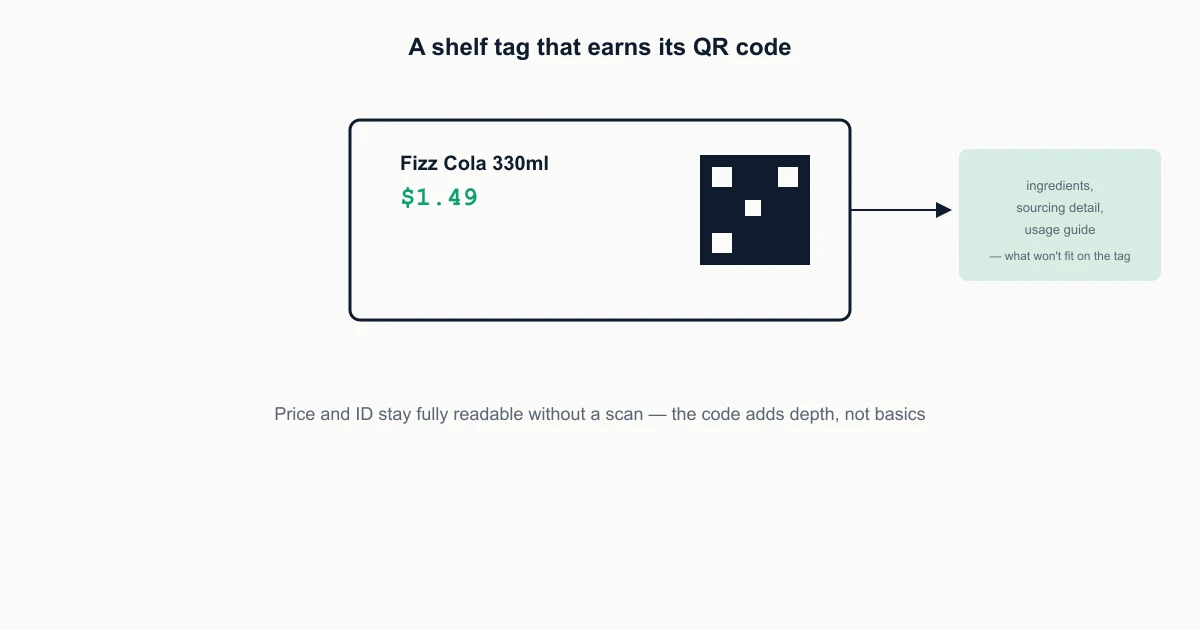
A QR code printed on a shelf tag only earns its place if scanning it gives a shopper something meaningfully better than what's already printed on the tag itself. A code that just links to the product's own webpage, which repeats information already visible on the shelf, adds visual clutter without adding real value. Used well, QR codes on shelf tags give shoppers access to information that genuinely can't fit on a small printed label — and used poorly, they're just a scan for the sake of scanning.
Where the extra information actually matters
Detailed ingredient and allergen information beyond what fits on standard packaging, nutritional comparisons across a product range, sourcing or sustainability detail for shoppers who care about it, or a link to usage instructions and recipes for an unfamiliar product all represent genuine value a shelf tag's limited space can't hold. These are cases where the QR code is solving a real information gap, not duplicating what's already visible.
Why scan rates are usually low, and why that's not necessarily a failure
Most shoppers don't scan most shelf-tag QR codes most of the time — that's a normal, expected pattern, not evidence the feature failed. The value comes from the smaller share of shoppers who do want deeper information before deciding, particularly for considered purchases (specialty, higher-price, or health-related products) where that extra research genuinely influences the decision. Measuring success by overall scan rate alone tends to undersell the feature's real purpose.
Practical considerations for using them well
- Keep the printed tag fully functional without the code — price, product name and basic identification should never depend on a shopper scanning anything; the QR code should add to a complete tag, not replace missing core information.
- Make sure the linked content is actually mobile-friendly and fast-loading, since a QR code that leads to a slow or poorly formatted page undermines the whole point of offering quick extra detail.
- Reserve QR codes for categories where the extra depth genuinely matters, rather than adding them uniformly across the whole store — a code on every single shelf tag, most leading to redundant information, trains shoppers to ignore them entirely.
- Keep the destination content current — a QR code linking to outdated pricing, discontinued claims, or broken pages damages shopper trust more than simply not having the code at all.
A closely related question is shelf signage hierarchy, which tends to come up around the same time. This connects to aisle width and accessibility code — the two are usually worth planning together. Worth checking next: case pack rounding problem, which covers a closely related part of the same decision.
FAQ
Do QR codes on shelf tags actually get scanned often?
Usage is typically a modest share of shoppers passing the tag, concentrated among those making a more considered purchase decision — this is expected, not a sign the feature isn't worth having for the categories where it adds real value.
Should every product category have QR codes on its shelf tags?
No — they're most valuable where there's genuine extra information a shopper might want that doesn't fit on the tag itself. Adding them uniformly, including to simple, well-understood staple products, mostly adds visual clutter without real benefit.
What's the biggest mistake stores make with shelf-tag QR codes?
Linking to content that just repeats what's already on the tag, or to a page that isn't properly optimized for a quick mobile scan — both undermine the value the code is supposed to add.