Types of planograms are usually grouped three ways: by scope (whole store vs one fixture), by format (text, image, 3D) and by placement strategy (vertical, horizontal, block and others). Most real planograms combine one choice from each group, for example an image-based shelf planogram using vertical brand blocks.
Knowing the groups helps when someone asks for "a planogram" and means something quite different from what you had in mind.
Grouped by scope: how much of the store it covers
| Scope | What it plans | Typical owner |
|---|---|---|
| Store layout plan | Departments, aisles, fixtures and traffic flow across the floor | Store design or operations |
| Category plan | One category across several fixtures, such as all of beverages | Category manager |
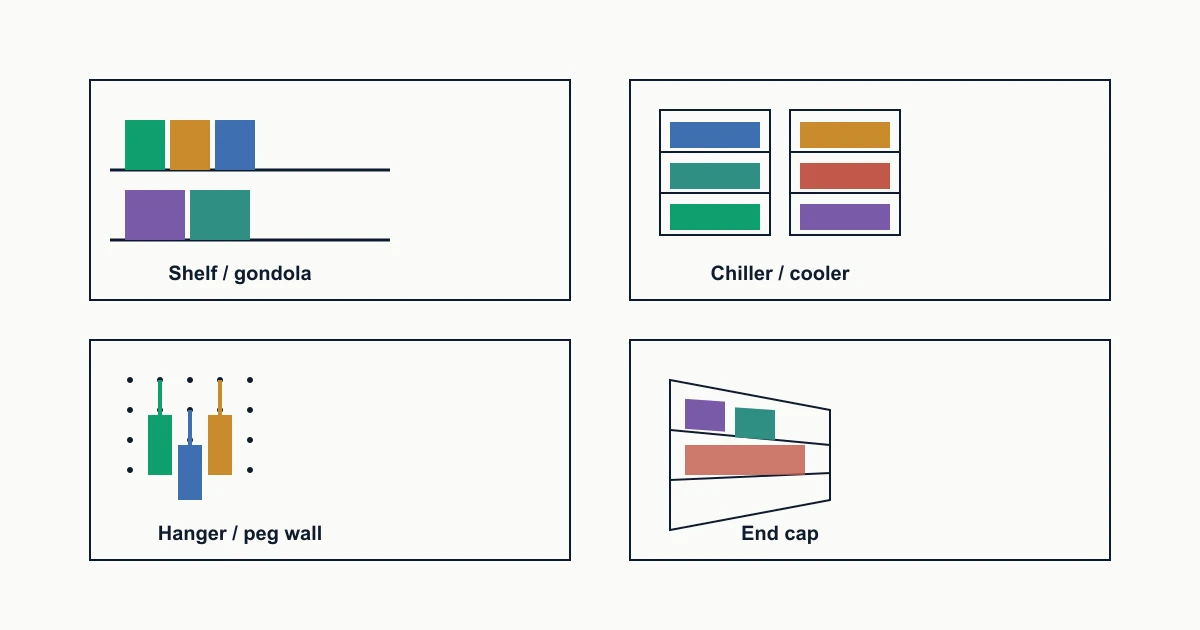
| Fixture or shelf planogram | Products on one bay, door or peg wall | Space planner or supplier |
| Display planogram | A secondary display such as an end cap or floor stand | Trade marketing |
When people say "planogram" without qualifiers, they usually mean the fixture-level plan. The store layout plan is closer to a floor plan; see planogram vs floor plan for that difference.
Grouped by format: how the plan is presented
- Text-based: a numbered list of positions, for example "shelf 2, position 3, SKU 1001, 4 facings". Cheap to produce, easy to misread.
- Image-based (2D front view): each product drawn to scale on the fixture. The most common format.
- Schematic or line drawing: simplified boxes with codes, designed for fast execution in store.
- 3D: a rendered view of the fixture or aisle, used mostly for presentations and approvals.
- Promotional display plans: separate plans for end caps and floor stands, usually with start and end dates.
- Photo-based: a photo of a correctly set fixture, used as a reference in small chains.
Grouped by placement strategy
These types of planograms describe the logic inside the plan:
- Vertical: a brand or segment runs top to bottom, so every block reaches eye level.
- Horizontal: a segment runs along a whole shelf, useful on narrow bays and for price tiers.
- Block: products grouped into blocks by brand, type or theme. Most planograms use blocks of some kind; our brand blocking planogram guide explains when to block by brand.
- Sales-based: space and the best positions follow sales velocity.
- Margin-based: higher-margin products get eye level and more facings.
- Market-share-based: brands get space roughly in line with their share of category sales.
- Promotional: temporary layouts for a campaign, often on end caps.
- Seasonal: layouts that change with holidays or weather.
- Assortment or regional: different product ranges for different store clusters.
Which type of planogram should you use?
Start from three questions:
- What decision is being made? Floor space → store layout. Products on a fixture → shelf planogram.
- Who will use it? Store staff need a clear 2D or schematic plan. Buyers and executives often prefer 3D.
- What does the category need? Brand-loyal categories suit vertical brand blocks. Price-led categories suit horizontal tiers.
A small shop might use one image-based shelf plan per fixture with sales-based placement. A chain might run cluster-specific, image-based planograms with vertical blocks and a separate promotional plan for each end cap.
Mixing types without confusing stores
Most problems come from mixing too many types on one fixture: a vertical brand block on the left, a horizontal price tier on the right and a seasonal insert in the middle. Shoppers lose the pattern, and staff cannot tell which rule wins when space runs short. Keep one primary logic per fixture and treat everything else as an exception noted on the plan. Wikipedia's visual merchandising entry gives useful background on why consistent patterns matter to shoppers.
Pick one logic per fixture
The types of planograms only matter because each answers a different question. Choose scope by the decision, format by the reader and placement strategy by how shoppers choose, then keep that logic consistent across the fixture. For the step-by-step method, see how to make a planogram.
FAQ
What are the main types of planograms?
Store-level layouts, category plans, fixture or shelf planograms and display planograms by scope; text, image, schematic and 3D by format; and vertical, horizontal and block by placement strategy.
What is the difference between vertical and horizontal planograms?
A vertical planogram runs a brand or segment from top to bottom of the fixture. A horizontal planogram runs it along one shelf.
Which planogram type is most common?
The image-based 2D shelf planogram, showing a front view of one fixture with products drawn to scale.
Is a 3D planogram worth producing?
Not for store execution. 3D helps presentations and approvals; 2D front views are easier for staff to follow.